Why I wrote my own text-to-speech package for Flutter
I replaced flutter_tts in Velorki with my own package, speak. What went wrong with spoken turn directions over music and Bluetooth, and what speak does.
By Steffen Römer4 min readEngineering
Velorki speaks its turn instructions, things like "In 200 metres, turn left." I expected that to be one of the easier parts of a navigation app. In practice it was the part riders noticed most when it went wrong, and fixing it led me to write speak, a small text-to-speech package for Flutter that I now publish on its own.
What a spoken direction has to get right#
Most riders have something else playing, music or a podcast or an audiobook, and often through a Bluetooth headset or speaker. A cue has to be heard from its first syllable, because "…eft" is not a direction. It has to come at the right moment or not at all. A "turn in 200 metres" that waited behind another cue and plays after the turn is worse than silence.
It also has to make room for itself and then give the room back. Music should get quieter while it speaks, a podcast should pause so no sentence is lost, and both should come back right after. And when the rider is on a phone call, the cue has to stay quiet.
Where flutter_tts fell short#
Velorki started out with flutter_tts, the widely used Flutter plugin. Speaking text worked fine. My problems were with everything around it.
On iOS the plugin gave up the shared audio session after every utterance. A Bluetooth headset then closed its audio link, and the next cue had to open it again, which swallowed or scrambled the first syllables.
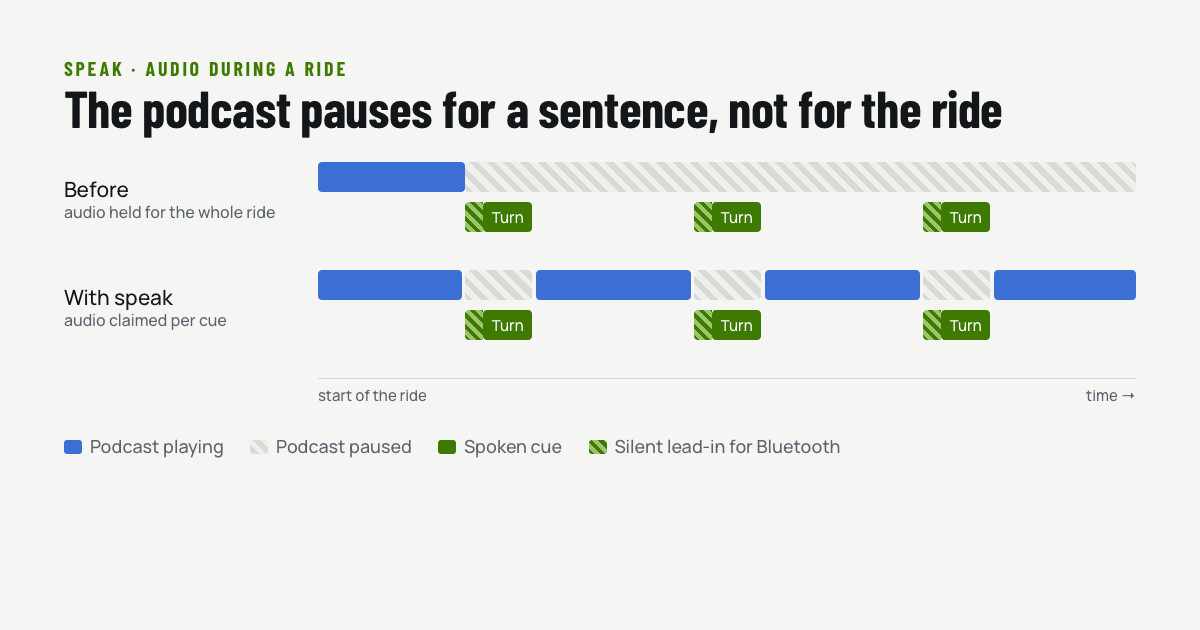
My workaround made things worse for podcast listeners. I kept the audio session for the whole ride and played a second of silence before each cue to wake the link. The cues were complete again, but a podcast that paused for the first cue stayed paused for the rest of the ride.
The plugin also had no real timing model. A call that returns when speaking starts can't tell you when the speech ended or whether something cut it off. Velorki had grown its own queue on top of it, built on guesses.
It was also the last CocoaPods dependency in the app. Everything else in the iOS build had moved to Swift Package Manager, and CocoaPods' central repository is going read-only. This one plugin kept the whole iOS build tied to it.
What speak does instead#
final speak = Speak(audio: SpeakAudio.navigation);

await speak('In two hundred metres, turn left.');
await speak('Turn left now.', queue: SpeakQueue.interrupt);
Every call can be awaited and reports how it ended: completed, interrupted, expired, or blocked by a phone call. Cues wait their turn by default, an urgent one can cut in, and a distance announcement can get a deadline after which it is dropped without being spoken.
speak claims audio only while it speaks. It takes the iOS audio session or Android's audio focus right before a cue and releases it shortly after, so a podcast pauses for one sentence and then carries on. On Bluetooth it adds a short silent lead-in, so the headset is awake when the first word arrives, and it holds on a moment after a cue so that two cues in a row don't reopen the link.
If a call is active, the cue ends as blocked instead of talking over the caller. On iOS that check uses CallKit. The package loads CallKit at run time instead of linking it, because the App Store in China doesn't accept apps that contain it.
In Velorki the rider chooses what happens to other audio during an instruction. By default spoken audio pauses and music gets quieter, and the other option only lowers the volume.
No native code to write#
speak calls each platform's own speech engine directly from Dart. On iOS and macOS that is AVFoundation through FFI, on Android TextToSpeech through JNI plus one small Java class for the progress callback, and on the web the Web Speech API. Flutter's build hooks generate and compile the glue, so an app only adds the package. There is no Podfile, Swift package or Kotlin code to write.
Testing something you have to hear#
CI machines have no speakers, and their speech engines behave accordingly. An Android emulator can report no voices for the first seconds after it starts, and engines sometimes stall on virtual audio devices. The package's CI runs on iOS, macOS, Android and the web, records what the engine reported, and retries only the stalls the environment causes, never a real failure.
In the end I tested it the way it is used, on the bike. Velorki has used speak for its guidance since version 1.2.3. Since then I have done a lot of rides through Manhattan with it, and so far it has always worked as expected.
Use it#
speak is BSD-licensed and on pub.dev, and the source is on GitHub. It is made for short prompts over other audio, such as directions, workout cues or timers. If you are looking for an alternative to flutter_tts for that kind of app, it may fit. Windows and Linux aren't supported yet. If you need one of them and can test on it, please open an issue.